Getting started with Doc2Vec
A hands-on guide for building your own doc2vec model


This post is a beginner’s guide for understanding the inner workings of doc2vec for NLP tasks.
There are two primary architectures for implementing doc2vec: namely Distributed Memory Model of Paragraph Vectors (PV-DM) and Distributed Bag-of-Words version of Paragraph Vector (PV-DBOW).
In this article, we’ll dive into how doc2vec is related to word2vec and explore both of their architectures while also getting some hands-on experience with them.
Intro
Before getting into the details on doc2vec, I’d recommend refreshing your memory in regards to word2vec models and the two different architectures, given that the architectures of doc2vec are nothing but an enhancement of the word2vec architectures. You can learn the basics of word2vec from my previous blog post:
As you might already know, there are multiple ways to change the text into vectors containing numerical values, such as:
- Label Encoding
- Custom Binary Encoding
- One-Hot Encoding
But as discussed in the article above, these standard methods lose the context of a given text. Word2vec attempts to solve this problem by creating vectors out of words; similarly, doc2vec is used to build vectors out of a document, independent of the document length.
Now you must be wondering why not use word2vec for the complete document.We’ll explore that next.
Doc2vec
The initial motivation behind building doc2vec was the unstructured nature of documents as compared with individual words. Doc2vec was created by Mikilov and Le in 2014. Mikolov was also one of the authors of the original word2vec research, which is another indicator that doc2vec is building on the word2vec architecture.
Original Paper:
Doc2vec uses an unsupervised learning approach to better understand documents as a whole. The architectures that we’re going to explore have an additional parameter as compared to the word2vec architectures: and that is its paragraph_id.
The parargaph_id, also known as a paragraph vector, was added to portray missing data from a document’s context (i.e. the subject of the paragraphs).
Smart move, right?
Without further ado, let’s explore the architectures of doc2vec.
Distributed Memory Version of Paragraph Vector (PV-DM)
This architecture is similar to the continuous bag-of-words (CBOW) model in word2vec.
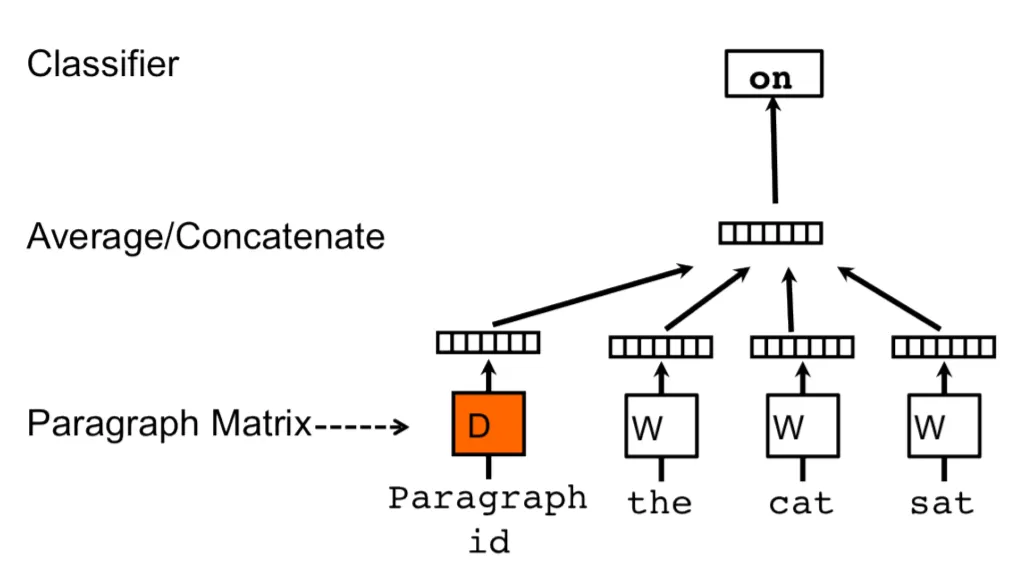
If you’ll recall the CBOW architecture from my word2vec article, then you’ll see that there’s simply the addition of the parargaph_id. Paragraph_id and word vectors are arbitrarily initialized. Each paragraph_id is relegated to a single record (document), while word vectors are shared among all records. Hence, you can say a paragraph_id is unique for each document.
Thus the document vector D is also trained while training the word vectors W. In the end, D contains the numeric representation of the record. So you can say,
A PV-DM model serves as a memory that recalls what’s absent from the current context (the topic of the paragraph).
Let’s take an example. Say we have the sentence “The cat sat on sofa.” A CBOW model learns to predict the word “sat”, provided the context of the individual words around it — the, cat, on, & sofa.
Similarly, in PV-DM, consecutive words are randomly sampled from a paragraph, and the model then tries to predict a center word from the randomly sampled set of words, taking into account the input — the context words and a paragraph_id.
Before moving on to the next architecture, let’s try to better understand the above diagram more clearly. The architecture consists of 3 parts. The first part is the paragraph matrix, which consists of the vector columns for a paragraph. Next, we have Average/Concatenate, which signifies whether the model would take the average or concatenate the paragraph and the word vectors. And in the end, we have the Classifier, which takes the input from the last hidden layer and tries to forecast the center word.
Get Abhinav Roy’s stories in your inbox
Join Medium for free to get updates from this writer.
Now that you have a better understanding of the flow, you’ll hopefully be able to grasp the second architecture easily.
Distributed Bag of Words Version of Paragraph Vector (PV-DBOW)
This architecture is the Skip-Gram version of Word2vec with the addition of paragraph_id parameter.

Rather than forecasting the next words, it utilizes a paragraph vector to classify all the words in the record. While training, a list of words is sampled and then a classifer is formed to classify whether a word belongs to the document so that word vectors can be learned. This model disregards the context words in the input, yet force the model to forecast words arbitrarily sampled from the paragraph in the output.
As compared to a skip-gram, where the current word is used as the input, DBOW utilizes the paragraph_id and predicts randomly sampled words from the record.
Let’s take the example given in the figure above. Suppose the model is learning by forecasting 2 sampled words. In order for the model to learn the document vector, two words are sampled from [the, cat, sat, on, the, sofa].
Enough discussion—let’s implement these architectures to get a better idea of how things work in practice.
Implementation
The module we’re going to use is Gensim (used for topic modeling, document indexing, and similarity retrieval), and the dataset we’ll use will be “text8”, which is a ~100MBs dataset that has been formed using random Wikipedia dumps (read more about it here). It can be downloaded using the Gensim downloader, as shown in the code below.
Now, open your command line and install Gensim…
$ pip install gensimOnce Gensim is installed, download the text8 dataset.
import gensim.downloader as api
dataset = api.load("text8")
In the “Initialize Models” cell, you’ll notice there’s an argument dm , which is set to 0 when working with the DBOW model and 1 while working with the PV-DM model.
In the end, we’ve called the most_similar function, which returns all the similar words throughout the document.
Yup that’s really it! We’re done.
Some more interesting links covering these topics that you might want to check out:
Deciding between DBOW & PV-DM
According to the authors, we should typically opt for a combination of both architectures. However, PV-DM wins the race and normally produces state-of-the-art results. Even in results achieved above, you’ll find that words similar to “violent” predicted by PV-DM are more accurate, as compared to the predictions made by DBOW.
But DBOW has it’s own benefits—it uses lesser memory and is faster than PV-DM because it doesn’t save the word vectors. And according to the results found, concatenation is consistently superior to the aggregate/average method in the PV-DM approach.
Conclusion
In this article, we explored the ideas and concepts behind doc2vec and implemented our own doc2vec model using both a DBOW and PV-DM architecture. You can further tweak the model to perform better (read more about how to do that here).
So that’s all for now. Feel free to reach out with any questions or and feedback.
Happy Learning :D
GitHub Gist Link:
https://gist.github.com/abhiinavx/aad89c7a4e9aa1b356b3652272ecfd0a#file-doc2vec-ipynb
Editor’s Note: Heartbeat is a contributor-driven online publication and community dedicated to providing premier educational resources for data science, machine learning, and deep learning practitioners. We’re committed to supporting and inspiring developers and engineers from all walks of life.
Editorially independent, Heartbeat is sponsored and published by Comet, an MLOps platform that enables data scientists & ML teams to track, compare, explain, & optimize their experiments. We pay our contributors, and we don’t sell ads.
If you’d like to contribute, head on over to our call for contributors. You can also sign up to receive our weekly newsletters (Deep Learning Weekly and the Comet Newsletter), join us on Slack, and follow Comet on Twitter and LinkedIn for resources, events, and much more that will help you build better ML models, faster.